


OffPlay Music: MP3 Player
5.00.00 Reviews
App Specs
- Version
- 1.0.3
- Updated On
- License
- Free
- Downloads
- 50,000+
- Developer
- jadid-lyoum
- Categories
- Music & Audio
- Platform
- Android
Screenshots
 Analysis by AppCompare
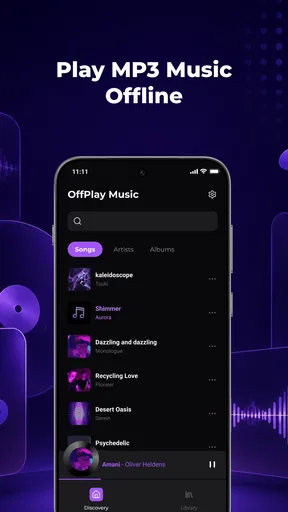
I often want to listen to music I already have without turning the experience into a search for a streaming subscription, a signal, or the right online catalog. OffPlay Music: MP3 Player is aimed at that straightforward job: it plays a personal MP3 library, supports playlists, and keeps playback available from the lock screen. I see it as a practical listening tool rather than a place to discover new music or produce audio.
That distinction matters when choosing a player. If your songs are already stored on your device and you want a simple way to organize listening, this app may fit naturally into your routine. If you expect streaming, recommendations, or a full editing studio, you will be better served elsewhere. My impression is that its appeal rests on doing the local-library basics without making the listener depend on an internet connection.
Starting with the music you already own
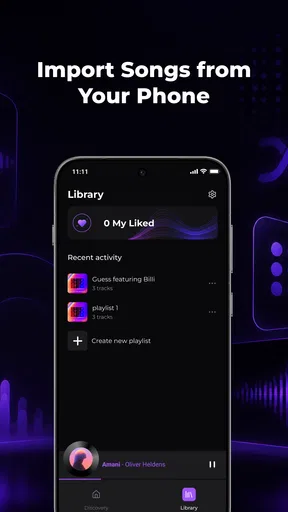
The useful starting point is a collection of MP3 files you can access on your device. Instead of browsing a streaming catalog, you are listening to your own library. That is especially handy for music you have saved for travel, recordings you keep for reference, or a set of familiar tracks you do not want to search for every time.
In everyday use, the offline focus changes the way I would plan a listening session. Before a commute, for example, I would make sure the tracks I want are already in the library and arrange them into a playlist. Once that is done, the session is less dependent on a mobile connection. The practical benefit is not a promise of extra audio tools; it is having a ready-to-play collection when network access is inconvenient.
OffPlay Music is a free music-and-audio app from jadid-lyoum. Its central idea is easy to understand: use it as a player for local MP3s, then rely on playlists and lock-screen playback to make listening easier to manage. It is not presented as a service that supplies a catalog, so the value depends on whether you already have music files to play.
That makes it a better fit for listeners with a purposeful collection than for someone starting from an empty library. If most of your listening begins with a recommendation feed or a new-release page, a streaming service will feel more useful. If you have albums or playlists stored locally and want to reach them directly, a dedicated player can avoid the extra steps of opening a broader entertainment app.
A library-first workflow
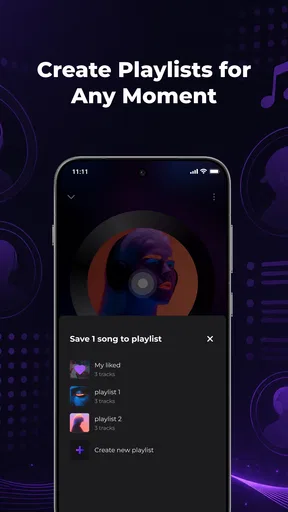
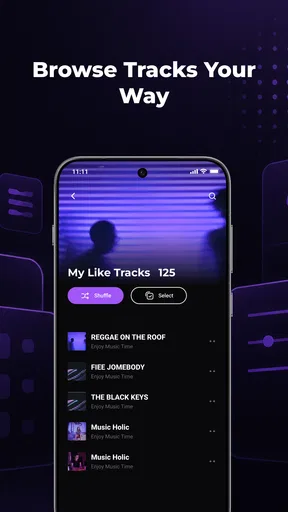
I would treat playlist creation as the main organizing step, not an afterthought. A commute playlist, a focus playlist, and a folder of longer listening sessions can each serve a different moment without requiring me to rebuild the queue every time. This is a modest but useful workflow: sort the music around how you listen, rather than around an online genre page or a recommendation algorithm.
Worth Reading Before You Choose

Baby Panda World Brings Quick Play to Modern Phones, but Its Game Library Feels Busy

ESPN’s Live Game View Makes Following Close Games Easier

QuizzLand Review: A Good Fit for Short Trivia Breaks, Not Every Player

Basketball Stars: Multiplayer Is Fast, but Can It Recover When Matches Go Wrong?

WEBTOON Turns Phone Updates Into a Better Reading Routine

Link to Windows Runs on Shared Habits, Not Social Feeds
There is also a sensible way to handle a mixed library. I would keep short, frequently played selections in a few focused playlists and leave less-used albums to browse when I have time. That reduces the chance that a quick listening session turns into scrolling through an entire collection. Since the app’s stated role is playback and playlist use, I would not assume that it can clean up tags, repair filenames, or edit audio; those jobs call for a separate library or editing tool.
For people who use music as part of creative work, the same approach can help with reference listening. A songwriter might group demos or influences for a focused session, while a video editor might keep a selection of locally stored tracks handy when reviewing timing ideas. The player can support listening and organization, but it should not be mistaken for a digital audio workstation or a publishing platform. It helps get sound in front of you; it does not make or deliver a finished creative project.
Keeping playback within reach
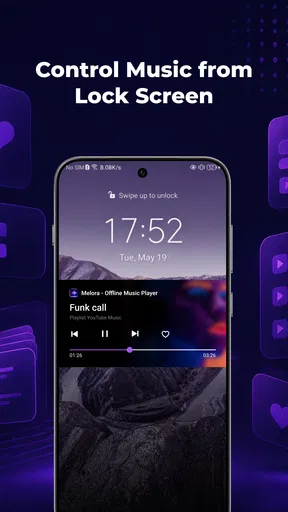
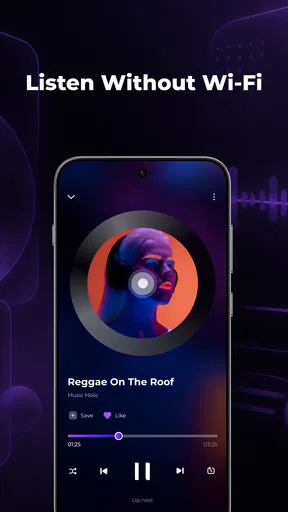
Lock-screen playback is one of the practical details that makes a player easier to live with. If I am walking, cooking, or carrying a bag, I do not want to open the app just to manage a listening session. Being able to control playback from the lock screen keeps the phone interaction brief and lets the music remain in the background of whatever I am doing.
A useful habit is to choose the playlist before putting the phone away. That way, the lock screen becomes a control surface for a session already planned, instead of a reason to keep returning to the app and changing tracks. This is a small workflow improvement rather than a hidden feature, but it matters in situations where repeated screen use is distracting or inconvenient.
Offline playback also changes the trade-off between convenience and preparation. A streaming app can be easier when you want to search for something you have not heard before, while a local player rewards you for organizing your files in advance. For a flight, a weak-signal journey, or a place where you prefer not to rely on data, that preparation can pay off. The catch is that a song not in your own library will not become available just because the player is installed.
Where the simple approach helps—and where it stops
The strongest case for this app is a listener who values control over a known collection. Playlists give that collection some structure, while lock-screen playback keeps routine listening uncomplicated. I also like that the purpose is narrow enough to be clear: it is about playing the music you have, not persuading you to spend time browsing a service.
The same narrow focus is its main limitation. A local MP3 player is not a replacement for a streaming catalog when you want fresh music, search across a large online library, or automatic suggestions based on listening habits. It is also not the right choice if your goal is to trim, mix, master, or publish audio. For those tasks, I would use a dedicated editor and treat this app as a way to listen to prepared files, if that suits the workflow.
There is a preparation cost too. A listener with scattered files may need to get the collection into usable shape before playlists become genuinely convenient. I would first gather the tracks I reach for most often, make a few purposeful playlists, and test that routine before moving an entire archive. That staged approach keeps setup manageable and quickly reveals whether a local-library player matches the way I actually listen.
Compared with the usual alternatives, the choice is less about which player has the longest feature list and more about where your music comes from. Streaming apps are stronger for discovery and broad catalogs; a local player is more fitting when the files themselves are the point. A general-purpose file manager may help locate audio, but it is not as naturally suited to repeated playlist listening. OffPlay Music occupies that practical middle ground: a music player for personal MP3s, not a complete music ecosystem.
What to expect before settling in
The app is rated for Everyone, so its audience is broad, but the more useful question is whether its approach fits your library. It has a 5.0 average from 61 ratings and 50K+ installs, which gives a sense of its current reach without telling me whether every listener’s collection will be organized in the same way. I would use those figures as context, not as a substitute for checking whether local playback is what I need.
The current release is version 1.0.3, and the stated minimum operating system is Android 8.0. I would check compatibility on my own device before building a routine around it. Because it is free, it is easy to consider as a basic player, but I would still judge it by the everyday task that matters: can I get to my own tracks, arrange a useful playlist, and control the session without unnecessary fuss?
One question a prospective user may have is whether this is useful without an internet connection. Its core purpose is offline playback of a local MP3 library, so it is specifically suited to listening that does not depend on a streaming connection. Another common concern is whether it can replace an editing app. It cannot be treated as an editing or publishing tool based on its role; I would prepare audio elsewhere and use this for listening and playlist organization.
I would also ask whether it makes sense for someone who mostly listens to music through a streaming service. In that case, probably not as a primary player: the streaming service already handles discovery and catalog access. It may still be worth considering if you keep a separate collection of MP3s for travel or personal reference. The decision comes down to whether that local collection is important enough to deserve its own simple listening workflow.
My creator-minded verdict
As a tool in a creative workflow, I would place this app near the listening and reference stage. I can imagine using it to keep a set of locally stored tracks organized for focused playback, then handing any actual editing or delivery work to software designed for those jobs. That separation is useful: a player does not need to pretend to be a studio to be helpful, and a studio is not always the quickest way to listen to a prepared playlist.
OffPlay Music is most appealing if you already have MP3s, prefer offline listening, and want playlists plus lock-screen control without making a larger streaming app the center of your routine. It is less compelling if your library lives online, if discovery is the main pleasure, or if you need tools to alter and publish audio. I would recommend giving it a try when the music you want is already yours and the job is simply to make listening to it more organized.
Making the first session useful
For a realistic first test, I would not import or sort every track I own. I would start with one small, dependable group: music for a regular walk, a handful of reference tracks for a project, or songs I know I will want on a journey. Then I would make a playlist around that single purpose and use it for a few sessions. That quickly answers the practical question that matters most: does a local-player routine save me effort, or does managing files feel like another chore?
This small trial also helps separate two different problems. If a track is difficult to find because the collection is messy, that is a library-organization issue; if I simply want a song I have never saved, a streaming catalog is the better tool. Knowing which problem I am trying to solve prevents me from expecting the player to compensate for missing music or disorganized files.
Choosing it for the right listening routine
I would especially consider this app if I keep a stable set of MP3s for situations where I want predictable access: a commute with unreliable reception, a listening session away from a desk, or a creative review where I need to replay the same references without browsing around. For a creator, a useful handoff is to prepare or export audio in the tool that made it, place the finished listening copies in the local collection, and use a playlist to review them. That keeps playback simple without confusing listening with production or delivery.
It is less suited to people whose music is scattered across services, who rely on cloud libraries, or who want automatic syncing between devices. I would also skip it as my main choice if I depend on rich discovery, shared social listening, or detailed audio editing. Those needs belong to broader streaming or production tools. OffPlay’s advantage is more specific: it gives a personal MP3 collection a straightforward route to playback, provided I am willing to prepare that collection myself.
Small trade-offs that shape daily use
The most useful non-obvious habit is to keep playlists narrow enough to match a real activity. A long all-purpose list may technically gather tracks together, but a short, purpose-built selection makes the lock-screen controls more valuable because I can start listening and leave the phone alone. I would also keep a separate reference playlist for work-in-progress listening rather than mixing those files into everyday music; it makes review sessions easier to return to and reduces accidental context-switching.
There is a corresponding trade-off: playlists depend on the files being present and organized on the device. If I move, rename, or remove tracks outside the player, I would check that the listening routine still works instead of assuming every saved selection will remain usable. I would test a playlist before leaving for a trip or starting a focused work session, not at the moment I need it. That is ordinary preparation, but it is precisely where an offline library differs from a streaming queue that can search a much larger catalog.
Overall, I see OffPlay Music as a focused companion for listening rather than a creative suite. It is worth trying when a personal MP3 collection is already part of your life and you want a direct, playlist-based way to hear it, including when you are offline. If your priority is finding new music, maintaining a cloud-based library, or changing and publishing audio, another kind of app will serve you better. For the listener who wants to press play on music they already have and get on with the day, that modest role is the point.
Pros
- Plays local music files without requiring an internet connection.
- Supports background playback while you use other apps.
- Includes playback controls on the lock screen.
- Lets you create playlists for organizing your music.
- Useful for listening to audio files stored on your device.
Cons
- You need to provide your own music files; it is not a streaming service.
- Your experience may depend on the audio formats the app supports.
- A large music library can take time to scan and organize.
- Some features or settings may be limited compared with advanced players.
- The app may request access to your device’s media files.
FAQs for OffPlay Music: MP3 Player
What is OffPlay Music: MP3 Player?
OffPlay Music: MP3 Player is designed for listening to music files stored on your device, rather than serving as a music-streaming catalog. It may suit listeners who already keep MP3s or other supported audio files on their phone and want a dedicated player. Check the app’s current store listing for its supported formats and features, since availability and functionality can differ by platform and version.
Can I use OffPlay Music without an internet connection?
A local-file music player can generally play tracks saved on your device without an internet connection, so offline listening may be a key reason to choose OffPlay Music. You will still need to download or transfer your audio files first, and some optional features could require connectivity. Confirm the app’s current permissions and listing before installing if offline use is essential to you.
Does OffPlay Music include songs, or do I need to add my own?
OffPlay Music: MP3 Player should be treated as a player for audio you already have, not as a service that necessarily supplies a library of songs. You may need to copy music to your device or make files available through the app’s library access. Only add files you are entitled to use, and check the listing to learn which folders and formats the current version can access.
Is OffPlay Music free, and does it contain ads or in-app purchases?
Pricing, advertising, and in-app purchase terms can vary by operating system, region, and app version. Before downloading, review the Google Play or Apple App Store listing for the current price, purchase options, subscription details, and any disclosures about ads. If the app offers optional paid features, check what they unlock and whether a recurring charge applies before confirming a purchase.
What permissions or compatibility details should I check before installing?
The app may request access to audio files or media on your device so it can find and play your music. Review the permission prompts and the developer’s privacy information, and grant only the access needed for the features you want. Also check the store listing for supported Android or iOS versions, device requirements, recent updates, and user feedback to confirm that it suits your phone.


